
 OnceHub
 ScheduleOnce

Introduction to Booking reassignment
Booking reassignment allows you to reassign bookings in your Activity stream from one Team member to another. This is useful in situations such as when a Team member is unavailable, or when a different Team member is better able to serve a specific Customer.
Calendar requirements
Section titled “Calendar requirements”Booking reassignment is only available between Users who are both connected to Google Calendar, or Users who are both not connected to any calendar. Booking reassignment is not available for Users connected to other calendars.
How to reassign a booking
Section titled “How to reassign a booking”To reassign a booking, select the activity you would like to reassign in the Activity stream. Then, in the Details pane, select Reassign the booking (Figure 1).
Learn more about reassigning a booking
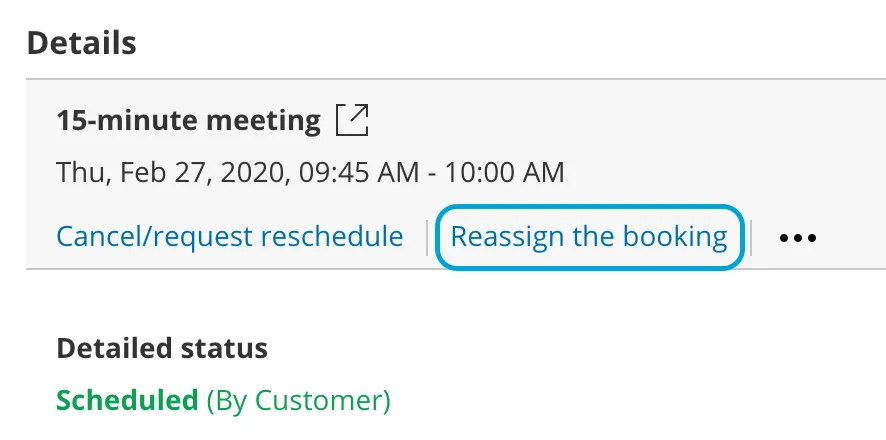 Figure 1: Reassign the booking
How does Booking reassignment work?
Section titled “How does Booking reassignment work?”When a booking is reassigned, the experience is invisible to Customers. From your Customer’s perspective, the event remains as originally scheduled. The Customer will receive notifications for the event as originally planned.
The original Booking owner, new Booking owner, and Booking page Editors will receive notifications regarding the reassignment. They will also have full permission to view and edit the booking from the Activity stream.
Learn more about the effects of Booking reassignment
Reassignment eligibility
Section titled “Reassignment eligibility”A booking must be a one-on-one meeting to be eligible for reassignment. Only OnceHub Administrators can reassign bookings.
Learn more about the rules of Booking reassignment
Booking pages available for assignment
Section titled “Booking pages available for assignment”If a booking is eligible for reassignment, you can reassign it to any Booking page in the system that has one-on-one meetings. The Booking reassignment wizard will show you the Booking pages that are available for assignment.
Reassignment FAQ
Section titled “Reassignment FAQ”You can find answers to the most commonly asked questions about Booking reassignment in our Booking reassignment FAQ.