
 OnceHub
 ScheduleOnce

Allowing automatic billing
To connect your OnceHub account to your PayPal account, you must allow automatic billing. When allowed, OnceHub will be able to charge a 1% transaction fee for each payment made via OnceHub, in addition to the fees charged by PayPal. Learn more about the OnceHub Master Services Agreement
Requirements
Section titled “Requirements”To allow automatic billing, you need:
- A PayPal Administrator
- A OnceHub Administrator
Allowing automatic billing
Section titled “Allowing automatic billing”- Hover over the lefthand menu and go to the Booking pages icon → open the lefthand sidebar → Integrations → Payment.
- Click the Get started button. The Connect to PayPal wizard pop-up appears (Figure 1).
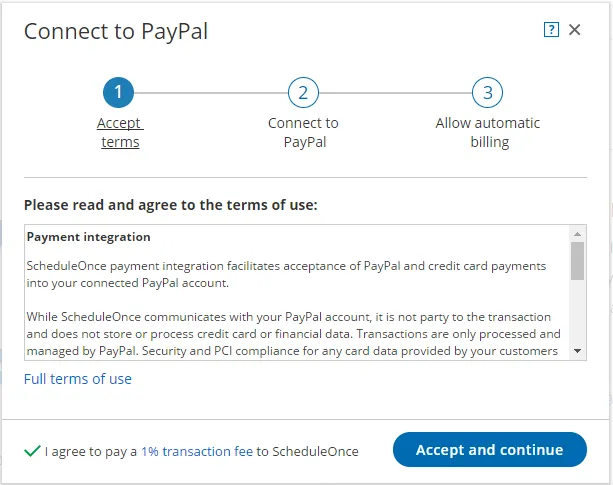 Figure 1: Accept terms
 - Read the terms of use and click Accept and continue. OnceHub charges a 1% transaction fee for payments made via OnceHub, in addition to the fees charged by PayPal.
- In the Connect to PayPal step, click the Connect to PayPal button (Figure 2). This will allow OnceHub to access your PayPal account via the PayPal API. Learn more about granting permissions to OnceHub
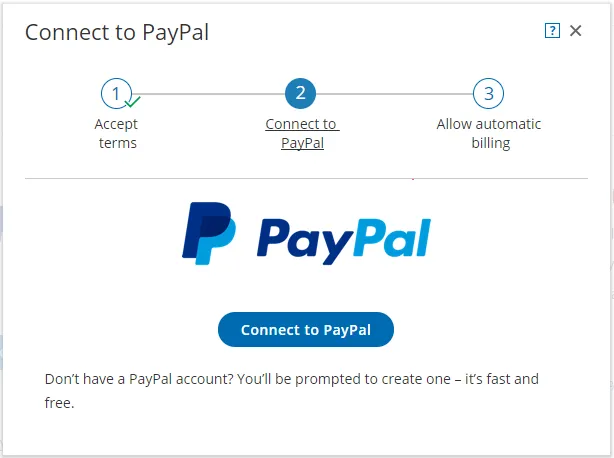 Figure 2: Grant permissions
 - After connecting to your PayPal account and granting permissions to OnceHub, you are automatically redirected to your OnceHub account to allow automatic billing. In the Allow automatic billing step, click the Allow automatic billing button. You are redirected to PayPal (Figure 3). When you allow automatic billing, you authorize OnceHub to charge a 1% transaction fee for each payment made via OnceHub, in addition to the fees charged by PayPal. Learn more about OnceHub Master Services Agreement.
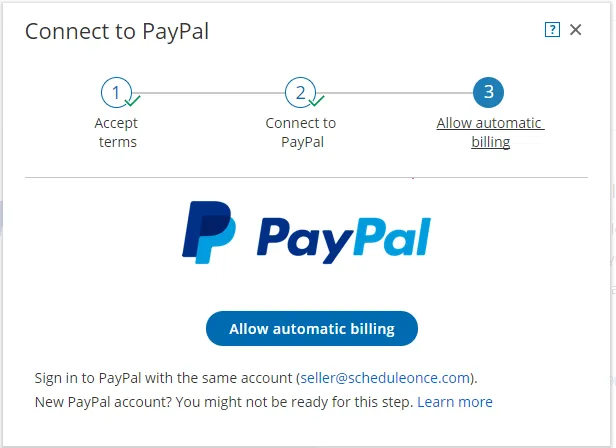 Figure 3: Allow automatic billing
 - Log in to your PayPal account using your PayPal credentials. Once logged in, you will be prompt to allow automatic billing with OnceHub (Figure 4).
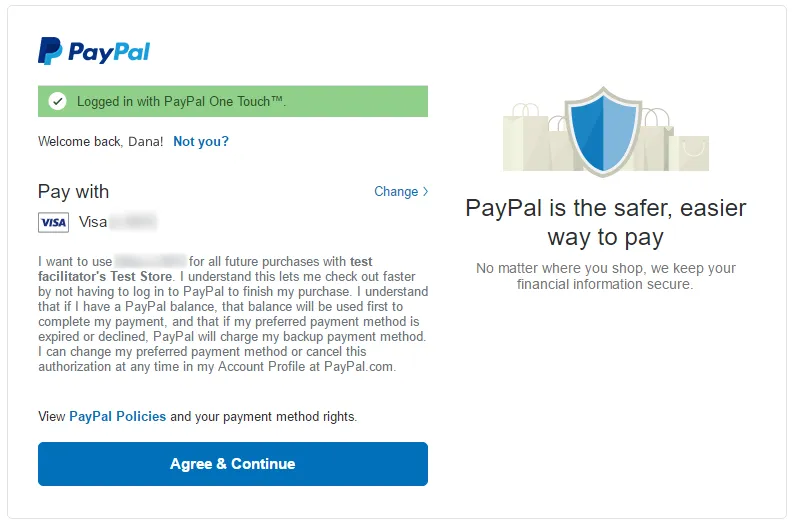 Figure 4: PayPal automatic billing
 - Click Agree & Continue to allow automatic billing. Once approved, OnceHub will be able to automatically charge your PayPal account a 1% transaction fee for each payment made via OnceHub.
Congratulations! You have allowed automatic billing. You’ll now be automatically redirected to the OnceHub application where you can customize the Payment settings.
© Copyright 2026 OnceHub. All rights reserved.