
 OnceHub
 ScheduleOnce

Image and Icon gallery
The image gallery contains images that you can use for your Event types, Booking pages, and Master pages.
How to use the image gallery
Section titled “How to use the image gallery”- To download an image in this article, right click it and select Save image as… from the menu.
- Save the image on your computer.
- Upload the image by clicking Choose file in the Public content section of an Event type, Booking page, or Master page (Figure 1).
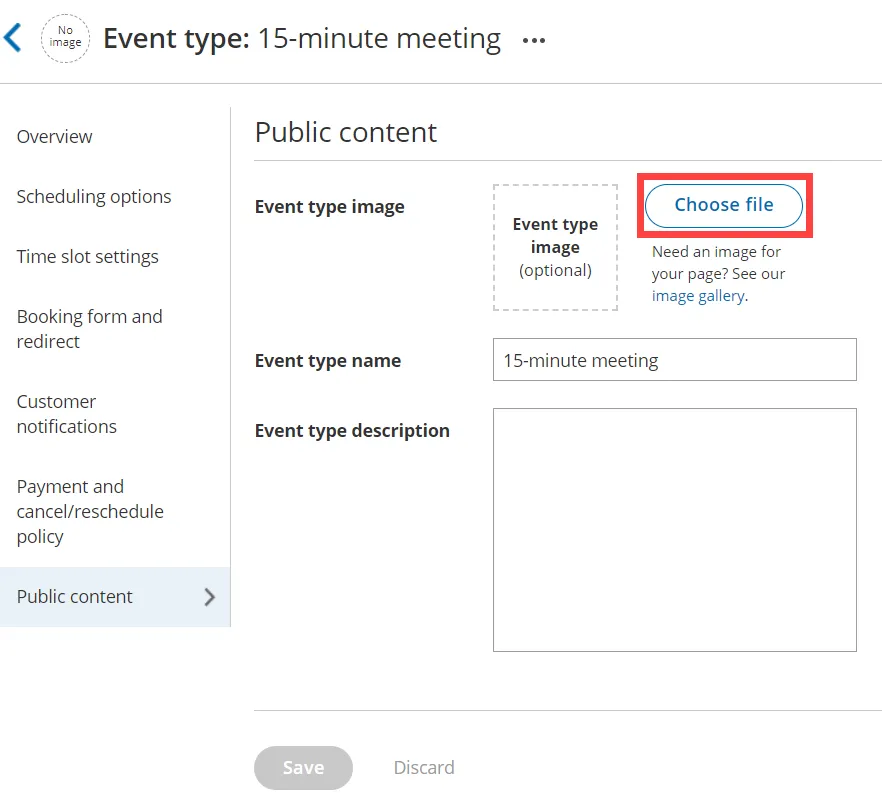 Figure 1: Event types Public content section
Image gallery
Section titled “Image gallery”Phone meeting


Face-to-face meeting









Office meeting





Web conference


Inquiries



Technical Support



Coaching

Sales/Financial




















Education/eLearning












Health and medical




Geographic regions








Duration


















Miscellaneous






Legal



Conference rooms






Language tutoring






Massage

Hair Salon

Photographer

Are you looking for other icons for your Booking or Master pages? Please let us know.
© Copyright 2026 OnceHub. All rights reserved.