
Uninstalling OnceHub for Gmail
The OnceHub for Gmail extension enables you to schedule meetings directly from your Gmail account. OnceHub for Gmail gives you instant access to all of your booking links without the need to change apps.
In this article, you’ll learn how to uninstall OnceHub for Gmail.
Uninstalling OnceHub for Gmail
Section titled “Uninstalling OnceHub for Gmail”From your Chrome browser settings
Section titled “From your Chrome browser settings”-
In your Chrome browser, click the three dots (action menu) in the top right corner (Figure 1).
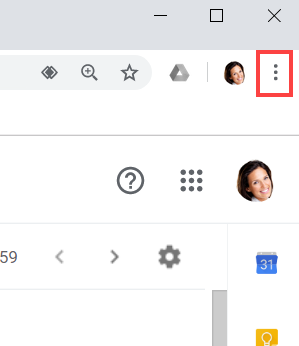 Figure 1: Chrome browser three dots (action menu)
 -
In the drop-down menu, select More tools -> Extensions.
-
In the OnceHub for Gmail box, click Remove (Figure 2).
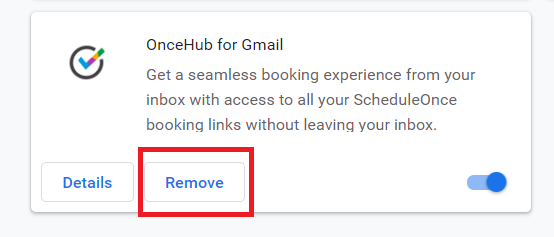 Figure 2: OnceHub for Gmail options in extensions menu.
 -
Once you click Remove, you will see a confirmation screen (Figure 3). Click Remove.
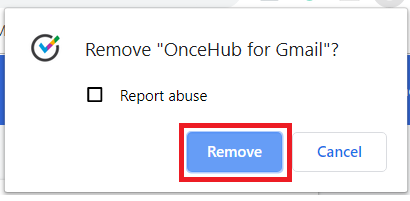 Figure 3: Removal confirmation.
From Chrome Web Store
Section titled “From Chrome Web Store”-
Click Remove from Chrome (Figure 4).
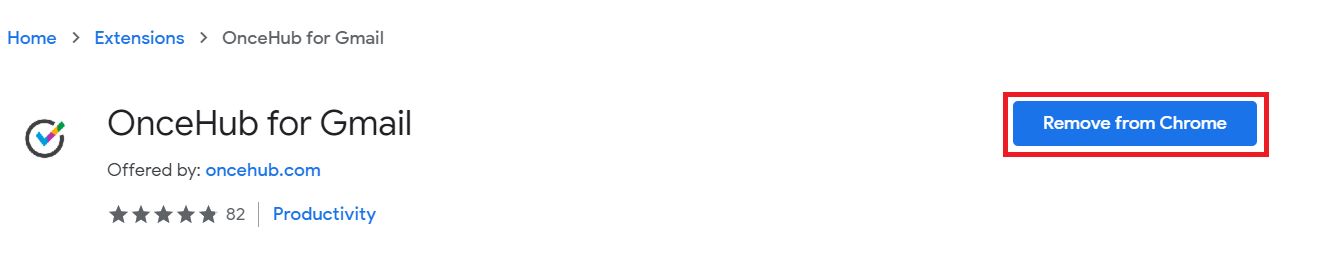
Figure 4: Removing OnceHub for Chrome in Chrome Web Store.