
Resource pool statistics: Bookings removed [Classic]
Resource pools allow you to dynamically distribute bookings among a group of Team members in the same department, location, or with any other shared characteristic.
Bookings removed is a metric provided for each Booking page you’ve included in a Resource pool. Bookings removed is the number of bookings that were taken away from a specific Booking page to date, within the existing Reporting cycle.
In this article, you’ll learn about viewing and understanding the Bookings removed metric.
<script id="snippet-prepend">$(function(){
/*disable in widget*/ if($('.w-documentation-article').length === 0){
var ToC = "<nav role='navigation' class='table-of-contents toc-top'><h4>In this article:" + "<ul>"; var el, title, link, header; //Define the heading levels you want to use in ascending order. Can add extra or remove unneeded. $(".hg-article-body h1, .hg-article-body h2, .hg-article-body h3, .hg-article-body h4").each(function() { el = $(this); title = el.text(); if(title != ''){ anchorTitle = el.text().replace(/([~!@#$%^&*()_+=`{}\[\]\|\\:;'<>,.\/\? ])+/g, '-').toLowerCase(); link = "#" + anchorTitle; //Set all headers to a 0-nesting level. header = 'header-nesting-0'; //Adjust header-nesting layers so that they point to the correct html tag. header-nesting-1 should match the second .hg-article-body h# listed above; header-nesting-2 should match the third, etc. if($(this).is('h2')){ header = 'header-nesting-1'; }else if($(this).is('h3')){ header = 'header-nesting-2' } el.html('<a id="'+anchorTitle+'" class="toc-anchor">' + el.html()); newLine = "<li class='"+header+"'>" + "<a class='article-anchor' href='" + link + "'>" + title + "" + "";
ToC += newLine; } }); ToC += "" + ""; $("#snippet-prepend").before(ToC); }});
</script><style>/* CSS to style the TOC as it displays and the auto-created anchors.toc-top styles the box for the TOC; adjust styles here to tweak look and feel */
.toc-top { background-color: #FAFAFA; /* set to #fff or delete entirely for no background */ border: 1px solid #C8C8C8; /* adjust the color hex here to change border color */ box-shadow: 0 1px 1px rgba(0, 0, 0, 0.05) inset; margin-top: 24px; margin-bottom: 36px; min-height: 20px; padding: 13px 20px; max-width: 75%;}.toc-top h4 { font-size: 18px; line-height: 26px; margin: 0 0 8px; font-weight: 400;}.toc-top ul { padding: 0 0 0 15px !important; margin-bottom: 0;}.toc-top > ul { margin-bottom: 13px!important;}.toc-anchor { display: block; height: 90px; margin-top: -90px; visibility: hidden;}
/* Set the indentation for the nesting levels. May need to be edited to match changes above. Increase or decrease the margin-left to get your desired level of indentation. */.header-nesting-1 { margin-left: 14px;}.header-nesting-1:before { background-image: url(https://dyzz9obi78pm5.cloudfront.net/app/image/id/5d31bcc88e121c9b25ba22c4/n/bulletv2.svg)!important;}.header-nesting-2 { margin-left: 28px;}.header-nesting-2:before { background-image: url(https://dyzz9obi78pm5.cloudfront.net/app/image/id/5d31be536e121cf22b0cc6ae/n/bulletv3.svg)!important;}</style>Requirements
Section titled “Requirements”To view the Bookings removed metric, you must be a OnceHub Administrator.
Viewing the Bookings removed metric
Section titled “Viewing the Bookings removed metric”-
Go to Booking pages in the bar on the left.
-
Select Resource pools on the left (Figure 1).
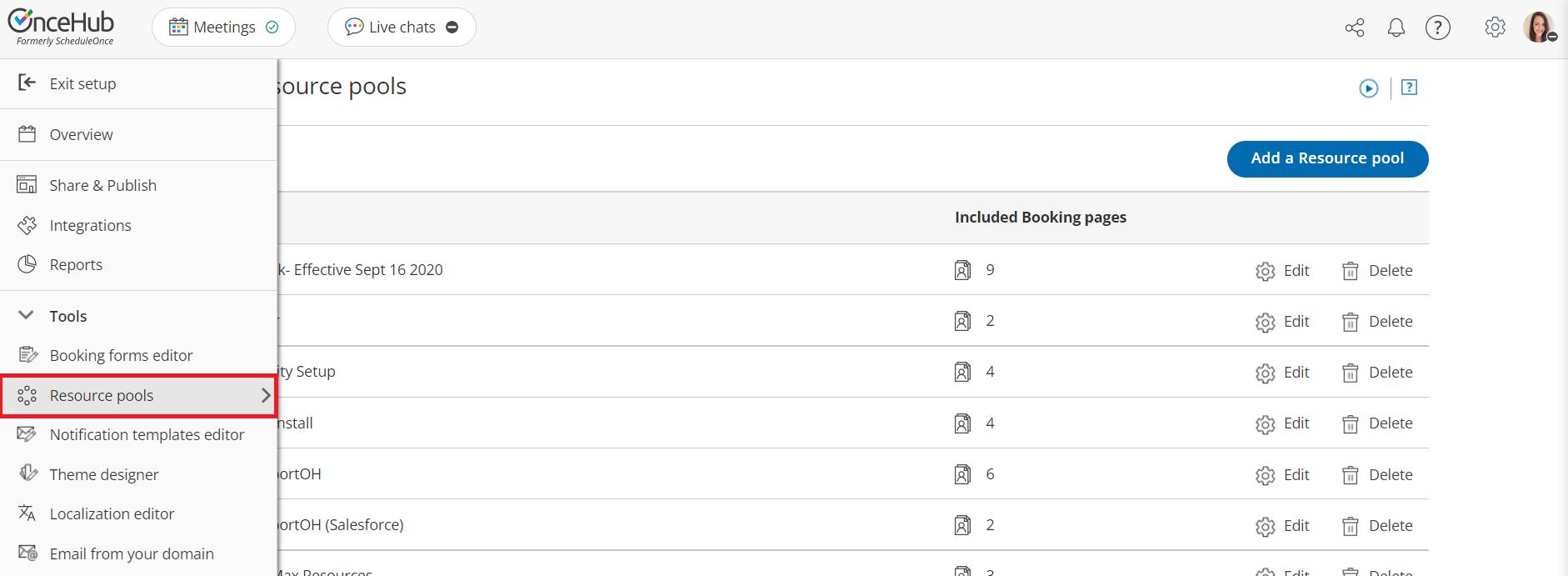
Figure 1: Resource pools
-
Select the specific Resource pool you would like to view Bookings removed for.
-
Go to the Resources section of the Resource pool (Figure 2).
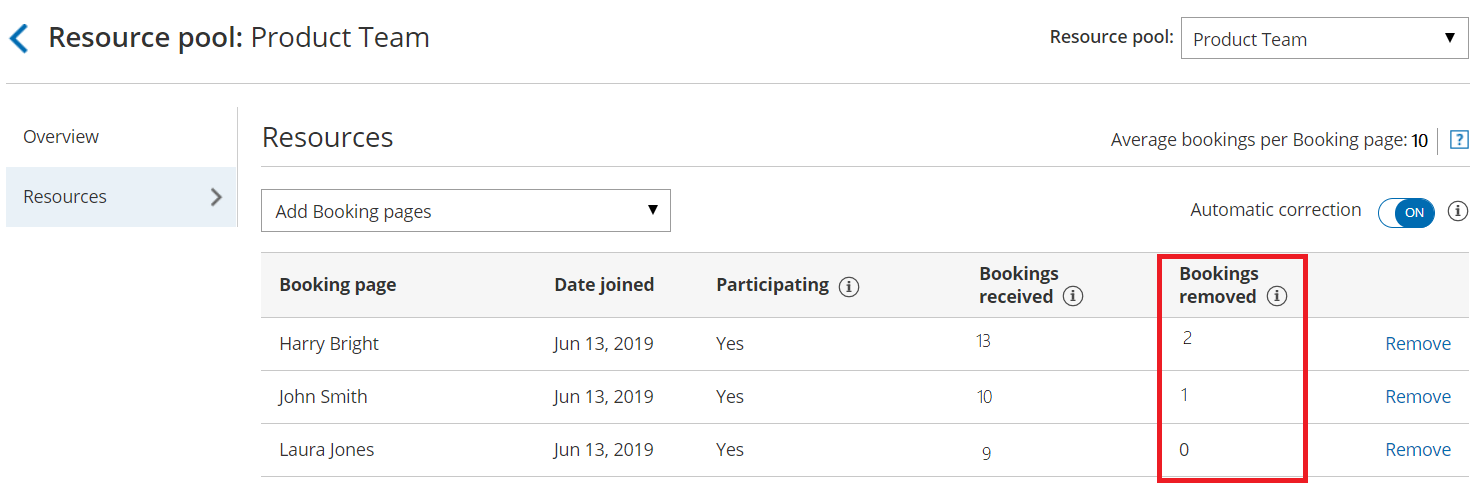 Figure 2: Bookings removed in the Resource pool’s Resources section
Understanding the Bookings removed metric
Section titled “Understanding the Bookings removed metric”If the specific Resource pool is included in multiple Master pages, the Bookings removed metric shown for each Booking page is the total number of bookings taken away from that Booking page across all Master pages.
Bookings can be removed from a Booking page due to cancellations, rescheduling, reassignments, or no-shows.
- Bookings removed due to cancellations: This happens when a Customer cancels a booking that was originally scheduled on the Master page that included the specific Resource pool, or when a User cancels a booking or requests the booking to be rescheduled.
- Bookings removed due to rescheduling: This happens when a Customer reschedules a booking and the booking is assigned to a different Booking page from the original Booking page that was assigned. In this case, the Bookings removed counter will go up by one for the original Booking page that the Customer scheduled with. The Bookings received counter will go up by one for the new Booking page that the Customer rescheduled with.
- Bookings removed due to reassignment: This happens when a User reassigns a booking from one Booking page to another. In this case, the Bookings removed counter will go up by one for the original Booking page that the booking was reassigned from. The Bookings received counter will go up by one for the new Booking page that the User reassigned the booking to.
- Bookings removed due to no-shows: This happens when a User marks a booking as a no-show. The booking marked as no-show needs to have been originally scheduled on the Master page that included the specific Resource pool.